

Coaching
One change a day. Never a grade.
Nothing is judged while you speak. When you finish, every coached answer reads the same way: your one change, your words, the coach’s rewrite, and Say it again.
Coming soon to the App Store.
Top to bottom
How a coached answer reads
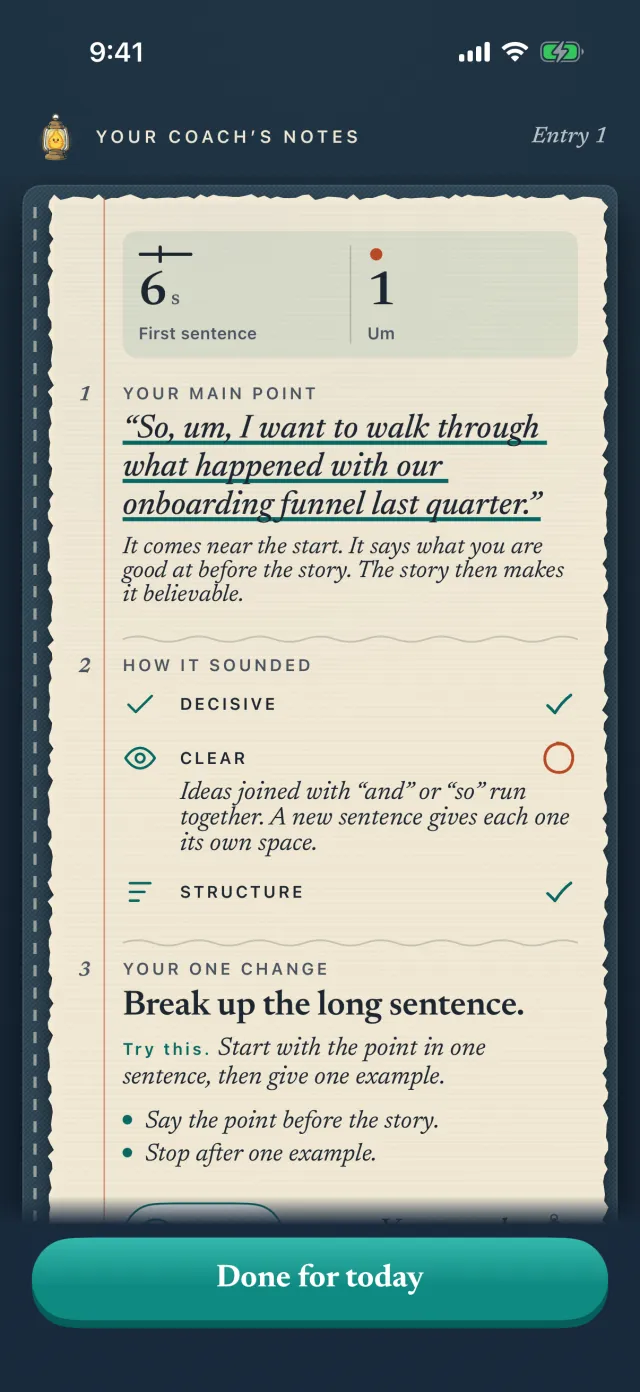


Your one change
You got to your main point after 6 seconds.
One plain headline, about one change. The rest of the screen is about that change too.
Your words
The moment, quoted from your answer.
Word for word, with the part before your main point dashed and your main point underlined in teal, and how many seconds came before it.
Say it like this
“I want to build the tools that fix what I keep seeing.”
The coach’s rewrite of your own sentence, main point first, with one line on why it works. It adds no numbers you did not say.
Your answer, as a line
Main point, softener and pause, labeled.
Under Also noticed, your answer as one line, with How to read the line one tap away.
Say it again
30 seconds, the same answer.
The retry is measured on your iPhone, for everyone, and shown against your first answer, such as how long it took to get to your main point. During your free coaching week, and with the Daily coaching plan, your coach adds a sentence on it. The day is complete either way.
Memory
Your coach’s notes. You can edit them.
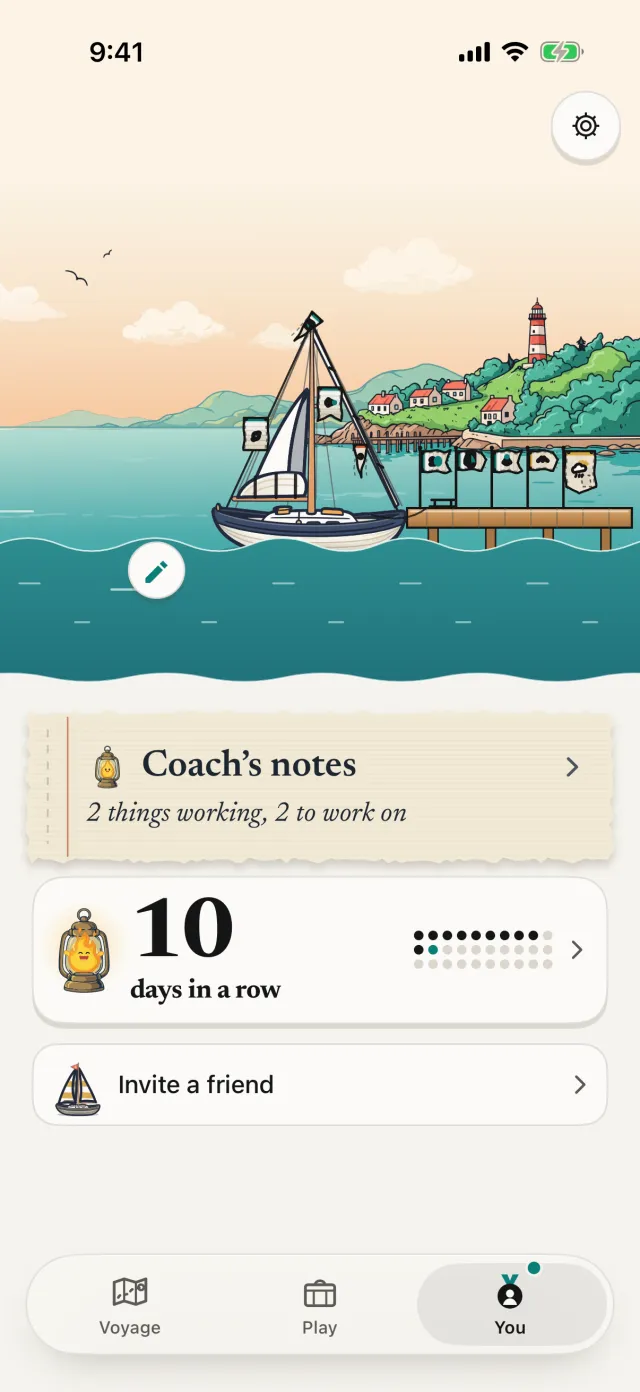
What to work on. Answer first, run-on sentences, fillers. The few habits your coach is following, each with a small line of your last 7 answers and a plain word: steady, or getting better.
What it remembers. A strength, a habit, what you are working on. Three short lines, such as “You set up context before your main point.” Tap a line to change it, or clear your coach’s notes. Your edit wins.
Saved on your iPhone. Sent with each coached answer so your coach remembers you. Our server does not save them. With the Daily coaching plan, your coach reads these notes before every answer, and can bring yesterday in, such as how your Say it again went.
How to read the line
Four marks. Nothing else.
The line is built from the audio recorded on your iPhone, so it is true even when the speech recognizer misses a word.
What Sayforth measures
Only what can be measured reliably.
Measured on your iPhone
- Pauses, how long and where
- Softener words, where they come
- Pace, how fast you spoke
- Length of the answer
Your main point is found by AI when coaching is on. With coaching off, your iPhone makes a simple guess.
Never shown
- Scores or tips while you speak. One quiet line moves with your voice so you know it is listening. The analysis comes after Finish
- Filler counts. When fillers matter, the coach quotes the moment from your answer. It never counts or scores them
- Loudness, pitch, accent or pronunciation
- An overall score, of any kind
Honest by rule
When a change is inside normal variation, the screen says so in words. “Pace moved 4 words a minute, which is inside normal variation. Call it about the same.”
Who does what
Measured on your iPhone. Coaching written by AI from the numbers and the text, never from your audio.
Evidence moments
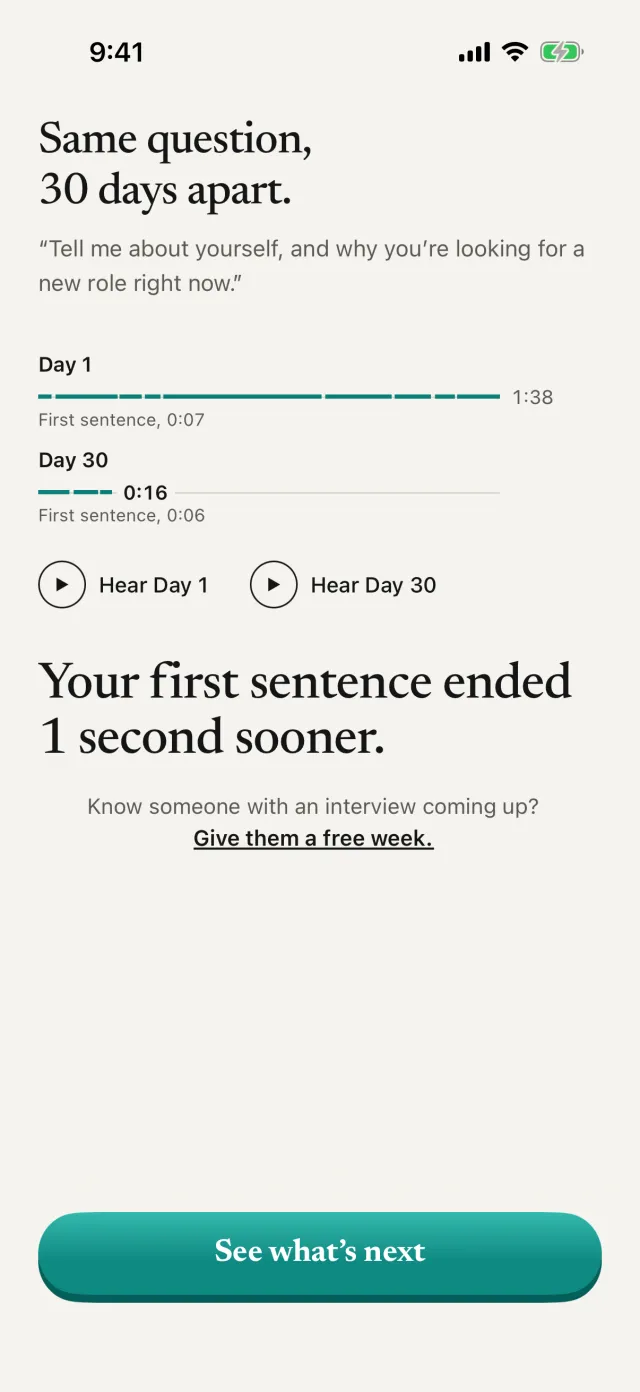
Same question, 30 days apart.
On Day 30 both answers sit on one clock, with one takeaway, two plain facts and a button to hear each.
Prep
A real interview coming up? Practice from the job listing.
Paste
Paste the job listing.
All of it: the role, what you would do, what they are looking for. Or share it to Sayforth from Safari. Add the company and your interview date if you like.
Read
What they’re looking for.
Sayforth reads the listing and pulls out what it asks for, quoted in the listing’s own words, then builds practice questions on those, plus why this company and one curveball. For an office coordinator listing, that might be scheduling, supplies and keeping a front desk running.
Practice
A plan that ends the day before.
A few questions a day take the place of your daily question until the interview, with a full run-through near the end and a rest day. The coach reads each answer against what the listing needs.
Honest
Practice questions, not the employer’s.
They are written from the listing and do not predict what you will be asked. Sayforth is not connected to the employer and does not check whether a listing is real. The listing stays on your iPhone until you delete it, and our server does not keep it.
The Daily coaching plan includes the full practice, coached on every answer. In your free coaching week you get the full practice. After that, the free plan includes a preview of 1 listing every 7 days: 1 question in full, and the rest of the set listed as locked. Interview practice from a job listing needs Sign in with Apple and reads listings in English for now.
Limits
No daily limit for normal use.
Coach as many answers as you like. If you send more than 150 answers in one day, coaching slows to 1 answer every 20 minutes for the rest of that day, and your answers are still measured on your iPhone while it waits.
Keep reading
From the blog
-
Practice
How to Stop Saying Um Without Counting It
Counting fillers rarely works. How to stop saying um by hearing where it lands first, then trading the sound for a pause you can actually feel.
-
Build log
Does Speech Recognition Remove Um?
Does speech recognition remove um? We tested Apple's recognizer and Whisper on real speech with every um marked. Most clean fillers up. Here is the data.
-
Practice
How to Stop Talking Too Fast When It Matters
How to stop talking too fast: find your own normal pace, hear where you speed up, and slow only the sentences that matter, with a five-minute exercise.

Day 1
This is where we start.
Nothing to get right.
Day 1 is one question and about a minute of your voice. It is your starting point, not a test.
Launch list
Start the 30-day challenge on launch day.
Practice is free. Coaching is free for 7 days, no card. Founding price: $49.99 a year if you subscribe in the first 90 days after launch.
iPhone, iOS 26 or later. Free to start.